These are 6-axis robots, meaning they have six rotating joints. Each joint, seen below, must rotate some amount in tandem with the others to place the end of the robots arm into a desired location.
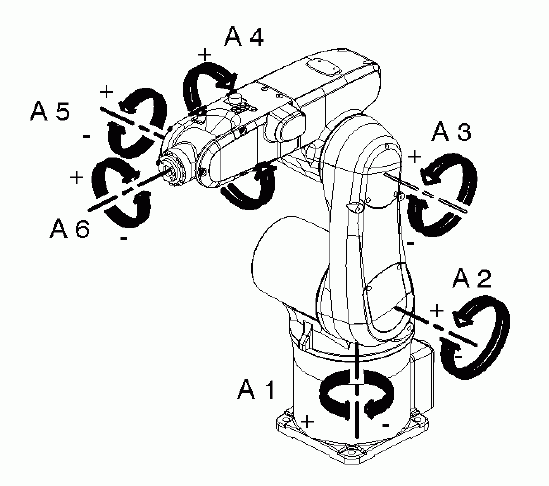
Because we want the robot to be able to use multiple tools and work on a variety of surfaces with different orientations, here are 3 coordinate systems that you need to understand in order to work the robots:
- World coordinate system
- Tool coordinate system
- Workpiece (or "base") coordinate system
It's not as confusing as it sounds.
World Coordinates
The center of a robot's world is located at the center point of the its base - it is the point around which axis A1 rotates.
This is how the robot navigates within its workcell.
- This is the world coordinate (0,0,0) and the robot's x, y, and z, axes are oriented to that.
- The world coordinate system is fixed and unchanging.
- The x, y, and z axes for each robot are oriented as if the user is standing with their back to the window, looking at the robot. Here, x goes from right to left, y goes from front to back, and z is up and down.
TCP or "Tool" Coordinates
Remember that the controller's job is to calculate the 6 angles of rotation that the axes must make to move the end of the robot's arm to a point in relation to the world (0,0,0).
The "end of the robot's arm" is called it's Tool Center Point (TCP).
When there is no tool on the machine, the default location of the TCP is at the center of the faceplate at the front of axis 6. This is (0,0,0) for your tool.

The TCP is the center of it's own cartesian system.
To Recap:
- The world coordinate system is how the robot navigates it's workcell. So that point
- If you think of the robot as an arm, with your tool as its hand, the faceplate is the severed wrist.
- When you calibrate a tool, you are transferring the TCP to a specific point at the tip of the tool.
Therefore:
- We can always reset the TCP and the work piece coordinate system to suit our needs and our space.
- We can rely on the World Coordinate System to ensure that the robot never forgets where it is.
- TCP is a relative spatial system, World is an unchanging system.

Whenever you are dealing with multiple coordinate systems, the Right Hand Rule is useful to remember: |